
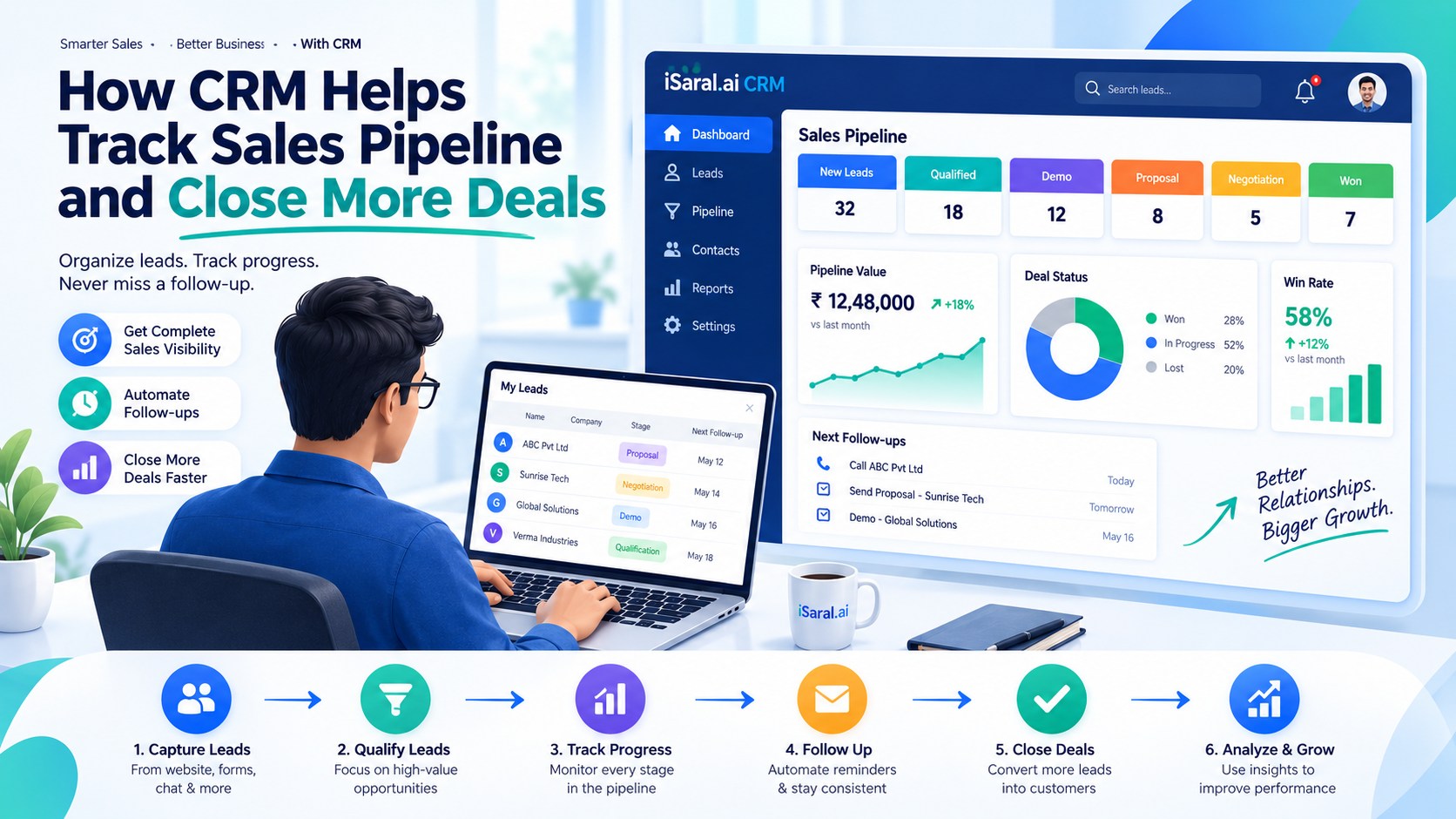
How CRM Helps Track Sales Pipeline and Close More Deals
In today's competitive business environment, managing customer relationships effectively is no longer optional — it's essential. Every lead represents a potential opportunity, but without a structured process to manage those opportunities, companies risk losing valuable customers. Missed follow-ups, scattered customer information, delayed responses, and poor visibility into sales activities can significantly impact revenue.
This is where Customer Relationship Management (CRM) software becomes a game changer. A CRM system centralizes customer data, streamlines sales activities, automates repetitive tasks, and provides real-time insights into every stage of the sales pipeline — instead of relying on spreadsheets, sticky notes, or disconnected tools.
In this guide, we'll explore how CRM helps businesses track their sales pipeline, improve customer relationships, and ultimately increase revenue.
What Is a Sales Pipeline?
A sales pipeline is a structured visual representation of the journey a potential customer takes before making a purchase. It helps businesses understand where each prospect is in the buying process and what actions are required to move them toward becoming a paying customer.
- New Lead
- Lead Qualification
- Initial Contact
- Needs Assessment
- Product Demonstration
- Proposal or Quotation
- Negotiation
- Deal Won / Deal Lost
- Post-Sales Follow-up
Common Challenges of Managing Sales Without CRM
Many businesses initially manage their sales process using spreadsheets, emails, notebooks, or messaging apps. While this may work for a handful of customers, it quickly becomes inefficient as the business grows.
- Missed follow-ups and lost opportunities
- Scattered customer information
- Poor team collaboration
- No visibility into performance
- Inaccurate revenue forecasting
- Automated follow-up reminders
- One centralized customer record
- Shared, real-time team visibility
- Live dashboards and reporting
- Data-driven, reliable forecasts
These challenges reduce efficiency and prevent businesses from reaching their full sales potential — which is exactly what a CRM is built to solve.
How CRM Helps Track Your Sales Pipeline
CRM software stores all customer information in one secure location, including contact details, communication history, meeting notes, quotations, documents, and payment status — so every team member always has access to updated information.
Instead of searching through spreadsheets, sales reps can instantly see new opportunities, ongoing negotiations, pending quotations, high-value deals, and closed sales — helping prioritize work so no opportunity is overlooked.
CRM automatically captures leads from website forms, landing pages, social media, email campaigns, WhatsApp, live chat, and referrals — assigning each one to the right rep and eliminating manual data entry.
CRM helps teams qualify leads based on budget, business size, industry, and buying intent. AI-powered CRM systems can even assign lead scores automatically, so reps focus on prospects with the highest conversion potential.
Most sales require multiple follow-ups before a customer decides to buy. CRM automatically schedules calls, emails, meetings, demos, and renewal reminders so nothing is forgotten.
Every interaction — calls, emails, meetings, WhatsApp chats, internal notes, and tasks — is recorded, giving every representative a complete view of the customer's journey.
CRM lets businesses create and send quotations quickly, track their status, record responses, and schedule follow-ups — so managers instantly know which quotations are awaiting approval.
Using real-time pipeline data, CRM helps estimate expected monthly revenue, quarterly targets, conversion rates, and average deal value — supporting better business planning and budgeting.
Key CRM Features That Help Close More Deals
Contact Management
Organizes customer profiles, making it easy to access communication history and important business information.
Sales Automation
Routine tasks like reminders, email sequences, and workflow updates are automated, freeing reps to focus on selling.
Task Management
Reps receive reminders for pending tasks, ensuring timely follow-ups and improved productivity.
Document Management
Store contracts, quotations, invoices, and proposals securely within the CRM for quick access.
Mobile CRM
Access customer information, update deals, and communicate with prospects from anywhere.
Reporting Dashboard
Interactive dashboards surface sales trends, team performance, revenue growth, and conversion percentage.
Benefits of CRM for Businesses
| Benefit | Without CRM | With CRM |
|---|---|---|
| Customer Relationships | Generic, inconsistent outreach | Personalized communication builds trust |
| Sales Productivity | Repetitive manual work | Automation frees time for selling |
| Response Times | Delayed replies | Instant notifications, faster response |
| Conversion Rates | Unstructured lead nurturing | Structured nurturing converts more leads |
| Team Collaboration | Siloed, duplicated outreach | Shared data reduces confusion |
| Forecasting | Guesswork estimates | Real-time, accurate reports |
How AI Enhances Modern CRM Systems
Artificial Intelligence is transforming traditional CRM software into intelligent business assistants.
Auto Lead Qualification
Automatically scores and qualifies leads based on buying signals
Predicts Buying Behavior
Analyzes patterns to forecast which prospects are ready to buy
Next Best Action
Recommends the most effective next step for each deal
High-Priority Detection
Flags high-value opportunities that need immediate attention
Automated Responses
Drafts and sends timely email responses and meeting invites
At-Risk Detection
Identifies customers who may churn so teams can step in early
Best Practices for Sales Pipeline Management
To get the most value from your CRM:
- 1Keep Customer Information Updated — Regular data hygiene ensures accuracy and relevance
- 2Define Clear Pipeline Stages — Everyone should know what each stage means
- 3Assign Ownership for Every Lead — No lead should be left unowned
- 4Follow Up Consistently — Let CRM automation handle the timing
- 5Review Dashboards Regularly — Catch bottlenecks before they cost deals
- 6Automate Repetitive Workflows — Free your team for high-value work
- 7Prioritize High-Value Opportunities — Focus effort where it matters most
- 8Analyze Lost Deals — Turn every loss into a lesson for next time
Track Your Sales Pipeline with CRM
Get expert guidance to set up your CRM, automate lead management, and close more deals faster.
Pipeline Assessment
Evaluate your current sales process and CRM capabilities
CRM Strategy
Custom roadmap for pipeline stages, automation, and forecasting
Implementation Support
End-to-end setup, configuration, and testing
Team Training
Comprehensive training for your sales team
Conclusion
A well-managed sales pipeline is the foundation of a successful sales strategy. CRM software empowers businesses to organize leads, automate follow-ups, monitor sales activities, and gain valuable insights that improve decision-making.
By providing complete visibility into every stage of the customer journey, CRM enables sales teams to work more efficiently and close more deals. Modern AI-powered CRM solutions take this further with intelligent automation, lead scoring, workflow optimization, and real-time analytics.
If you're ready to modernize your sales process, iSaral AI can help you implement a CRM solution tailored to your business needs.
Frequently Asked Questions
What is the main benefit of using a CRM to track sales?
The main benefit is complete visibility into every stage of the pipeline, so no lead is forgotten, follow-ups happen on time, and managers can forecast revenue accurately.
How does CRM improve lead follow-ups?
CRM automatically schedules calls, emails, meetings, and reminders based on where a lead sits in the pipeline, ensuring consistent, timely engagement.
Can CRM help with sales forecasting?
Yes, CRM uses real-time pipeline data to estimate expected revenue, conversion rates, and average deal value, supporting more accurate business planning.
Is CRM useful for small businesses too?
Absolutely. Even small teams benefit from centralized customer data, automated follow-ups, and clear pipeline visibility as they scale beyond spreadsheets.
How does AI improve CRM pipeline tracking?
AI-powered CRM automatically scores and qualifies leads, predicts buying behavior, recommends next best actions, and flags at-risk customers — reducing manual effort.
What happens to deals that are lost?
CRM records lost deals so teams can analyze why they were lost and refine their sales process, messaging, or qualification criteria going forward.
Which CRM features matter most for closing deals?
Contact management, sales automation, task reminders, document management, mobile access, and reporting dashboards all directly support faster, more informed deal closures.
Explore More Resources
Why 80% of Small Businesses Waste Time on WhatsApp
Discover how to streamline your communication and boost productivity with AI-powered CRM integration.
🧠 Consumer InsightsThe Psychology of Indian Consumers
Discover the key factors that influence Indian consumer behavior, purchasing decisions, and buying patterns to help businesses create effective marketing and sales strategies.
🎯 Lead GenHow to Generate Qualified Leads Online
Strategic guide to attracting, qualifying, and converting high-value prospects.